A visual of all Tanks is available in Agvance SKY Energy. Initially opening Agvance SKY Energy / Map will require the Default City or Zip Code to be entered before the filter pane will collapse. On the Filters panel of the Agvance SKY Energy Map page, the Default City or Zip Code field returns the top 5 suggestions (US and Canada addresses only) based on what is typed. Select from these suggestions to zoom the map to the relevant location.

After the initial entry, this information will be stored in the browser. To edit the Default Location or Zip Code, select the Filters button, make the change, then select Apply Filters.

In the bottom right corner are Map Camera Controls and a link to view Keyboard Shortcuts for navigating the map by mouse or keyboard.
Note: Current markers stay and new are added when moving around the map and when zooming in or out.


The view is limited to 10,000 Tanks. If there are over 10,000 to display, the following message displays.
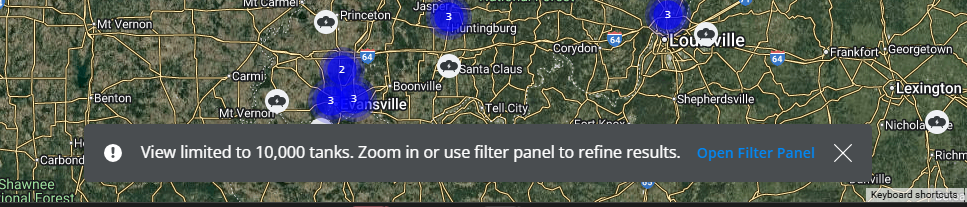
Select Open Filter Panel to open the filter pane and filter Tanks further.
Optionally check Labels under Satellite to show imagery with street names on the map and Terrain under Map to incorporate a representation of the Earth's surface elevation, creating a more realistic and detailed view.
 |
 |
Select a Tank icon on the Energy Map to see a more detailed card with the tank Serial Number, Delivery/Tank type, and Customer Name. Select the detail card to redirect to the Tank Information page in a new browser tab.

- If multiple Tanks exist at the same address, the Tanks will show with a stack indicator showing how many have the same location. Expand the information panel to show details for each Tank at the location.
- If multiple Tanks exist at a location, select the icon and scroll to view the additional Tanks on the list.
- If the cluster has a number greater than 10 or the mean value of the average clusters in the area (whichever is higher), then the cluster shows as red. Otherwise, the cluster shows as blue.
Note: To differentiate between Work Orders and deliveries when routing, Energy Work Orders will display as Wrench icons and Product Delivery Orders as Tank icons. If a Tank and Work Order exist in the same location, a Tank will display on the map but the two separate icons show when clicked to expand the details.
